
Skills
The Skills page is where you install, configure, and manage everything that extends what the agent knows how to do — community skills from GitHub, your own uploaded skill packages, the agent's self-written skills, and the small set of built-in tools that ship with Axiom.
Admin only. Regular users don't see this page.
What is a skill? This page is about managing skills. For what skills are, the difference between skills and tools, the three flavors (user-installed / agent-created / built-in), and the
SKILL.mdcontract, see Skills concept.
Layout
The page is a single tab bar with three tabs and a per-tab page header action:
| Tab | What it shows | Header action |
|---|---|---|
| Installed Skills | Skills you installed via URL or file upload. Disk: /data/skills/<owner>/<name>/. | Add Skill |
| Agent Skills | Skills the agent wrote for itself, plus the built-in skills shipped with Axiom. Read-only here. Disk: /data/skills_agent/<name>/. | — |
| Built-in Tools | The two compiled-in tools (web_fetch, web_search) and their config. Not skills — actual TypeScript tools. | — |
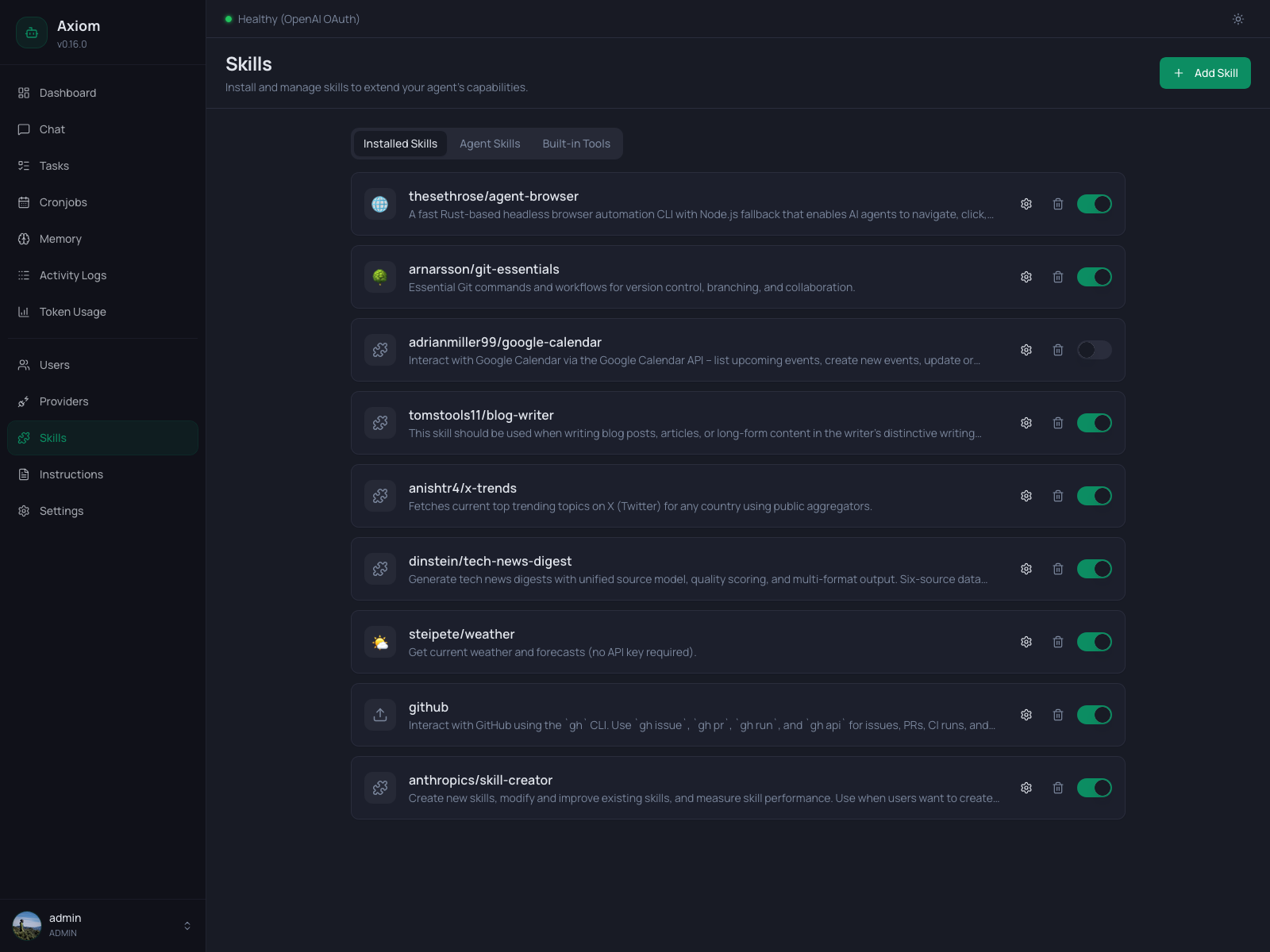
The screenshot at the top shows the Installed Skills tab.
Installed Skills
The default tab. One card per skill, each with:
- Icon / Emoji — the skill's emoji from its
SKILL.mdfrontmatter, or a generic puzzle/upload icon as a fallback. - Skill id —
<owner>/<name>for skills installed from URL (e.g.thesethrose/agent-browser), or just the bare name for skills installed via file upload (theuploaded/prefix is hidden in the UI but kept on disk). - Description — single-line summary from the skill's frontmatter, truncated.
- Settings (gear) — opens the per-skill settings dialog.
- Delete (trash) — opens a confirmation dialog. Removing a skill removes its files from disk.
- Enabled toggle — flips
enabledon the skill record. Disabled skills are hidden from<available_skills>in the system prompt — the agent can't see or load them.
Empty state
When you haven't installed any skills yet:
"No skills installed." Skills add new capabilities to your agent. Install your first skill to get started.
Comes with an inline Add your first skill button.
Add Skill dialog
Opened by the Add Skill button (or the empty-state button). Two install modes selected via tabs at the top:
From URL
A single text input. Accepts:
- OpenClaw shorthand —
<owner>/<name>(e.g.zats/perplexity). The backend resolves this to a GitHub URL via the OpenClaw skill registry. - Direct GitHub URL — including subpath URLs that point at a single skill inside a multi-skill repo, e.g.
https://github.com/anthropics/skills/tree/main/skills/pdf.
Two example chips below the input show the supported formats. Press Enter or click Install to fetch.
Upload File
A drag-and-drop zone (or click-to-pick). Accepts .zip and .skill files, up to 50 MB. Selected files appear as a single row with name, size, and an × button to remove.
Uploaded skills land under /data/skills/uploaded/<name>/ on disk; in the UI they show up without the uploaded/ prefix and with an upload-arrow icon.
Errors
If the install fails (invalid URL, bad zip, missing SKILL.md, name collision, …), a destructive banner appears inside the dialog with the backend's error message. The dialog stays open so you can fix and retry.
Per-skill settings
The gear icon on a skill row opens its settings dialog. The title shows the skill's emoji and id; the body is one section: environment variables.
Declared env vars
Every variable the skill's SKILL.md declares under required_env_vars is rendered as a labeled password input. Existing values are masked — the placeholder reads "Enter value (leave empty to keep current)". Type a new value to replace the stored one, or leave blank to keep what's already saved.
Declared variables can't be removed from this list — they're declared by the skill author, so removing them from the configuration would break the skill's own contract.
Custom env vars
Below the declared list there's an Add Environment Variable row with a text input (placeholder VARIABLE_NAME) and a + button. Adding here lets you set values for variables the skill doesn't declare in its frontmatter — useful when a skill reads secondary env vars at runtime that weren't documented in SKILL.md.
Custom (i.e. not declared) variables get an × next to their label so you can remove them later.
Save
The Save button writes both envValues (the actual secret values) and envKeys (the list of custom keys, so they show up next time). Values are stored encrypted at rest in skills.json using ENCRYPTION_KEY — see Configuration.
Skill env vars vs. global secrets. Skill env vars are scoped to the loading agent's environment for that skill's execution. For values that should be available to every skill (or to shell tools generally), use Settings → Secrets instead — those become process-level env vars.
Delete a skill
The trash icon on a skill row opens a ConfirmDialog:
Are you sure you want to delete skill
<name>? This will remove the skill files from disk.
Confirming deletes the directory under /data/skills/<owner>/<name>/ and the skill's row in skills.json. Cronjobs that had this skill in their attachedSkills list keep the reference but the runner will warn at firing time and skip the missing skill — see Tasks & Cronjobs → attached_skills.
Agent Skills
The second tab — read-only. Lists every skill under /data/skills_agent/, which is where:
- The agent itself writes skills it produces during conversations (e.g. when you ask "make this a reusable workflow").
- Built-in skills shipped with Axiom land after the entrypoint seeds them on container start (e.g.
tasks-and-cronjobs,wiki,nitter).
Both kinds are indistinguishable at runtime — the difference is only at startup, where built-ins may be auto-updated based on their semver. See Skills concept → built-in skills for the full mechanics.
Cards
Each card shows:
- A sparkles icon (signaling agent-side rather than user-installed).
- The skill name and one-line description (from
SKILL.md). - Metadata badges when the skill declares any optional gating in its frontmatter:
- ⚠
<VAR>(warning) — arequired_env_varsvalue is missing from the environment. The skill is still listed but won't load successfully without the variable. <platform>(secondary) — platforms the skill supports (linux,macos, …). Skills with a non-matching platform are hidden from the prompt entirely; this badge is a hint to operators when running the backend outside the standard Linux container.- needs:
<toolset>(muted) — a tool the skill depends on. Skills whose required toolset is disabled don't show up in<available_skills>at all; the badge tells you which prerequisite to re-enable.
- ⚠
Hovering any badge reveals a tooltip with the same explanation.
What's not on this tab
- No install action — agent skills are produced by the agent (or shipped with the image), not added by hand.
- No delete or toggle — these skills are always loadable by the agent. To remove a built-in skill permanently, see the
managed: falseopt-out described in Skills concept. - No env-var configuration — agent skills that need secrets typically read them from process-level env vars (configured under Settings → Secrets).
Empty state
"No agent-created skills yet." The agent can create its own skills during conversations. They will appear here.
This state is rare in practice — the built-in skills are seeded on every container start, so the tab is usually populated immediately.
Built-in Tools
The third tab is not a skill list — it's the configuration surface for the two compiled-in tools that ship with the Axiom binary.
web_fetch
A single card with a description and an enabled toggle. Disabling it removes the web_fetch tool from the agent's tool registry — the agent can't fetch URLs anymore. There is no further configuration.
The toggle saves immediately on flip; no separate Save button.
web_search
A more configurable card. Title, description, and an enabled toggle at the top.
When enabled, three additional fields appear:
| Field | Notes |
|---|---|
| Search Provider | DuckDuckGo (default, no key needed), Brave Search, SearXNG, or Tavily. |
| Brave Search API Key | Visible only when provider = Brave. Password field; existing key is masked. Hint: "Leave empty to keep the existing key." |
| SearXNG Instance URL | Visible only when provider = SearXNG. Free-text URL. Use this for self-hosted SearXNG instances. |
| Tavily API Key | Visible only when provider = Tavily. Password field; existing key is masked. Get a free key at https://app.tavily.com (1,000 queries/month free). |
Click Save at the bottom of the card to persist the changes. Unlike the toggle, the provider/key/URL fields don't auto-save — you have to click Save explicitly.
The Brave and Tavily API keys are encrypted at rest in the same way as provider API keys; see Configuration → Why ENCRYPTION_KEY matters.
See also
- Skills concept — what skills are, the three flavors, the
SKILL.mdcontract, gating fields, built-in skill auto-update mechanics. - Built-in Tools — the broader catalog of compiled-in tools (only
web_fetchandweb_searchare user-configurable from this page). - Tasks & Cronjobs →
attached_skills— how to bake a skill'sSKILL.mddirectly into a cronjob's prompt. - Settings → Secrets — global env vars / process-level secrets (alternative to per-skill env vars).
- Configuration — the
ENCRYPTION_KEYthat protects skill env values and provider keys at rest.